
The first time I seriously searched how to download YouTube videos, it wasn't for anything complicated. I was simply trying to finish watching a tutorial on a train.
The signal kept cutting out. The video buffered every few seconds. I tried lowering the resolution, but it didn't help much. At that moment, it hit me how dependent streaming had made me. I had access to millions of videos, but only when the internet cooperated.

Later that week, I ran into the same issue again---this time with a long interview I wanted to rewatch for work. The video was still online, but I knew it might not stay there forever. Creators delete content. Channels get taken down. Links break.
That's when I realized learning how to download YouTube videos wasn't about convenience anymore. It was about control. I wanted to decide when and where I could watch content, without worrying about Wi-Fi, platform rules, or disappearing videos.
Other Real-Life Scenarios Where Downloading YouTube Videos Makes Sense
Once I started paying attention, I noticed how often the need to download YouTube videos comes up in everyday life---for people from all walks of life. It's not just about convenience; it's about solving real problems that streaming alone can't address.
Travel: Offline Learning & Entertainment on the Go
Take travel, for example. Whenever I plan a trip, I spend hours curating educational videos about my destination---history documentaries, local food guides, and transportation tutorials. But airports, trains, and remote areas rarely have reliable internet, so I always search for how to download YouTube videos to device or how to download YouTube videos to camera roll before I leave.
Students: Offline Access for Study & Exam Prep
Students are another group that benefits immensely from downloading YouTube videos. I have friends in college who rely on YouTube for everything from lecture recordings (shared by professors) to explainers for tough subjects like calculus or chemistry. Many study in libraries with spotty Wi-Fi or in dorm rooms where bandwidth is stretched thin by dozens of roommates.
They often ask me questions like how to download YouTube videos in laptop with Chrome,because they primarily work on their school-issued computers, and they need to access study materials offline during cramming sessions or group projects.
Content Creators: Reusing, Editing & Backing Up Own Content
Content creators themselves are also frequent seekers of YouTube download solutions.
I've spoken to several small-scale creators who upload videos to YouTube but want to reuse clips for other projects---like compiling a highlight reel for their portfolio, creating short-form content for TikTok or Reels, or re-editing old videos with better audio (which is where tools like DeVoice come in handy).
They often ask about how to download YouTube videos app because they need quick, mobile-friendly ways to access their own content on the go. Many are frustrated by YouTube Premium's limitations---they've paid for the subscription, but they still can't get actual video files to edit; instead, they're stuck with app-only downloads that expire if they cancel their membership.
Parents
Parents are another unexpected group that benefits from downloading YouTube videos.
Many use YouTube Kids or family-friendly channels to keep their children entertained during long car rides, doctor's appointments, or quiet time at home. But streaming requires a constant internet connection, which isn't always available---and even when it is, data charges can add up quickly. Parents often search for safe ways to download educational videos or cartoons so their kids can watch without interruptions, without worrying about accidental clicks on inappropriate ads.
People in Low-Internet Areas: Saving Data & Beating Connectivity Issues
Then there are people who live in areas with limited internet access---rural communities, developing countries, or places where internet plans are expensive and data caps are tight. For them, streaming a single video can use up a significant portion of their monthly data, making it impractical to watch content regularly. Downloading YouTube videos allows them to save content when they have access to Wi-Fi (like at a library or café) and watch it later without using any data.
All these situations point to the same truth: streaming alone doesn't fit the messy, unpredictable reality of daily life. People need flexibility---they need to access content when, where, and how they want. And that's why learning how to download YouTube videos safely and legally has become such a valuable skill.
How to download YouTube videos legally
The only fully authorized way to download videos is through YouTube Premium. This paid subscription allows users to save videos within the YouTube mobile app for offline viewing. While this option is safe and compliant, it comes with limitations.
Downloaded videos cannot be accessed as independent files, transferred to other devices, or stored permanently. Content may also expire after a period of time and requires periodic internet verification. Because of these restrictions, many users explore alternative tools, which can vary in safety and legality. A safer approach is to focus on content that is public domain, Creative Commons licensed, or explicitly permitted by the creator. When downloading is not allowed, alternatives such as Watch Later playlists, official creator websites, or licensed platforms with offline viewing can provide similar convenience without violating policies.
Five Tools for How to Download YouTube Videos
After years of experimenting, I've tried or reviewed many tools that claim to solve this problem. Below are five types of tools people commonly use, starting with the one I personally rely on.
1) DeVoice (My Go-To Choice)
DeVoice is the tool I now rely on most when someone asks me how to download YouTube videos with links.
It's a browser-based tool that requires no installation, no sign-up, and no credit card information---making it accessible to anyone with an internet connection. What sets DeVoice apart from other downloaders is its focus on simplicity, speed, and user safety.
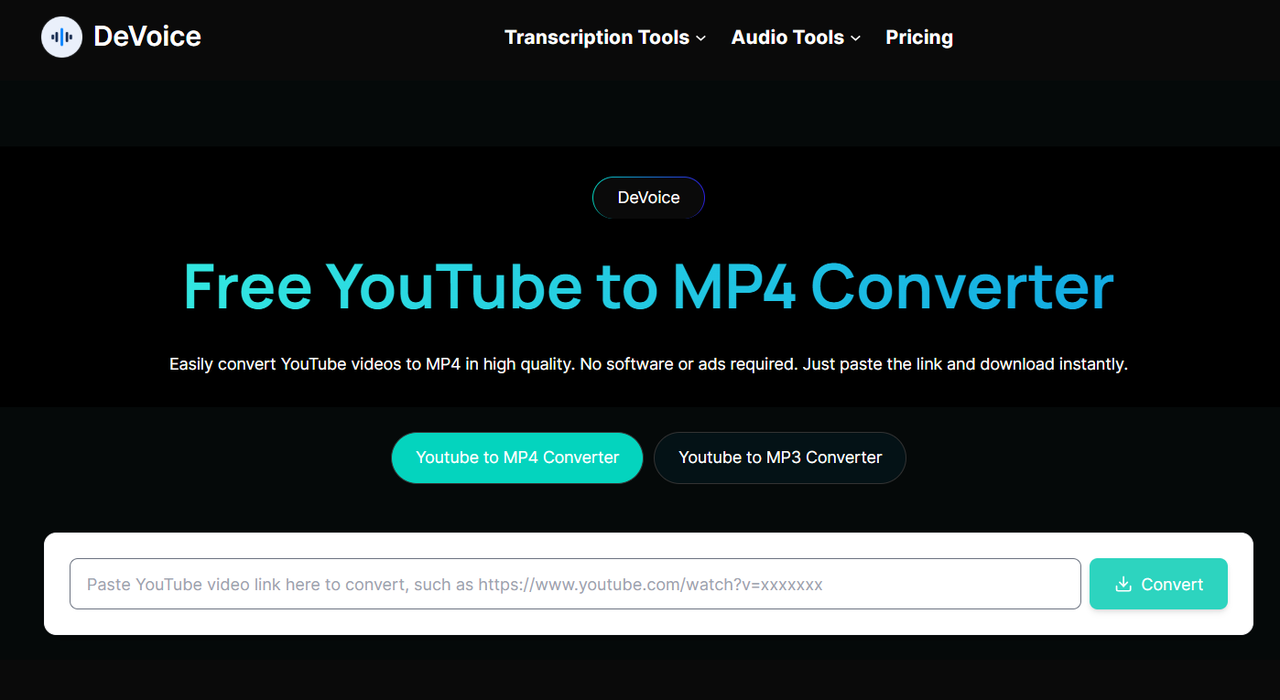
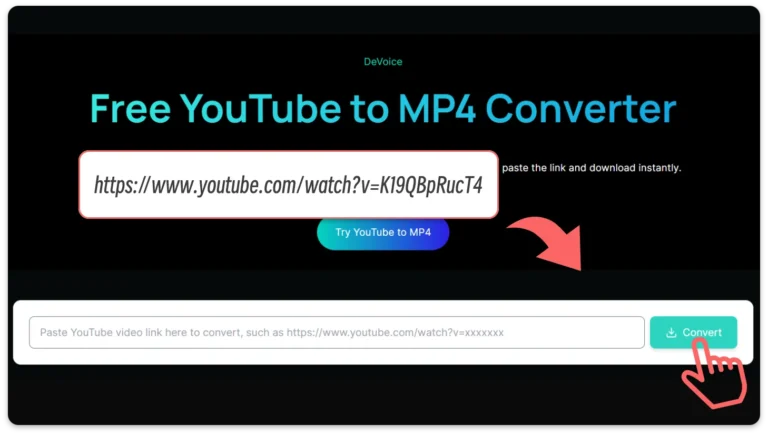
When I first tested DeVoice, I was impressed by how clean and intuitive the interface is. Unlike many free download sites that are cluttered with fake "Download" buttons, aggressive pop-up ads, and confusing navigation, DeVoice's YouTube MP4 Downloader page is straightforward: a single input box for the video URL, and a "Converter" button.
2) Desktop Downloader Software
However, desktop software has significant drawbacks. First, it requires regular updates to keep up with YouTube's algorithm changes---if you don't update the app, it may stop working suddenly. Second, many free versions of these tools come with ads, watermarks on downloaded videos, or limits on download quality (e.g., 720p max unless you pay for a premium version). Third, desktop apps require system permissions, which can pose security risks if the software is from an untrusted source. Finally, they're not portable---you can't use them on multiple devices without reinstalling, which is inconvenient for users who switch between a laptop and a desktop.
3) Browser Extensions
Extensions are popular among users searching how to download YouTube videos in laptop with Chrome.
But extensions have major limitations. First, YouTube frequently updates its code to block download extensions, so many stop working after a few months. Second, some extensions collect user data (like browsing history or download activity) and sell it to third parties, raising privacy concerns. Third, browser extensions can slow down your browser or cause compatibility issues with other plugins. Finally, most extensions don't work on mobile browsers, limiting their usefulness for users who primarily watch YouTube on their phones.
4) Mobile Download Apps
People often search for apps that allow them to download YouTube videos for free, hoping to find a simple mobile solution. The problem is, these apps are frequently removed from app stores or bundled with ads and various restrictions.
5) Online Converter Websites
Online converters are widely used because they don't require installation. However, many of them rely heavily on pop-ups and misleading download buttons, which can be frustrating or risky.
How to Download YouTube Videos Safely with DeVoice
This is where DeVoice offers a different approach. Instead of acting like a typical free downloader packed with ads, DeVoice is built around simplicity, speed, and user safety.The process is straightforward:
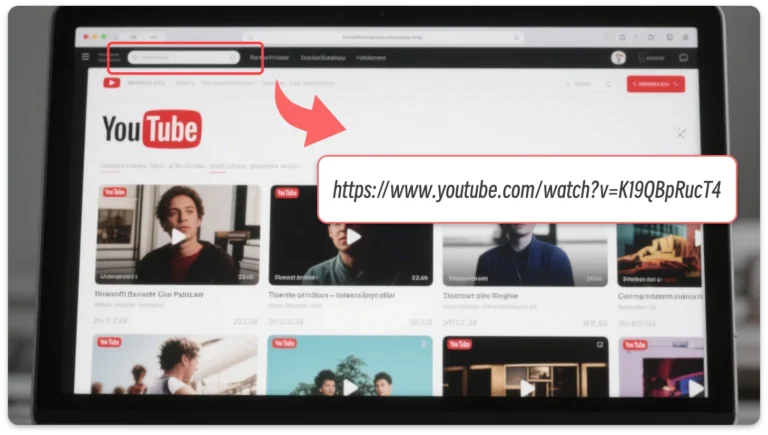
- Copy the URL: Open the YouTube video you want to download. Right-click the address bar and copy the video's URL.
- Paste on DeVoice: Go to devoice.io and find the input box on the YouTube MP4 Downloader page. Paste the copied URL there.
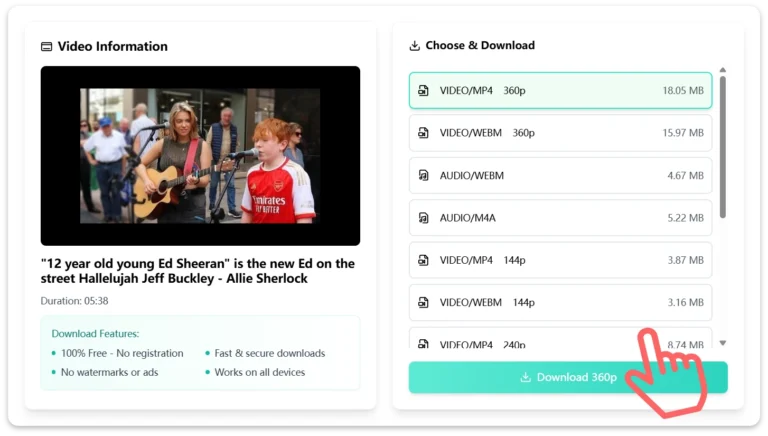
- Convert and Download: Select MP4 as your desired format. Within seconds, DeVoice will process and generate your download link.
Important: Downloading YouTube content comes with responsibility. Personal use or educational reference is different from redistributing copyrighted material. Always respect creators' rights and follow fair use guidelines.
Key Legal Reminders
It's important to remember that "personal use" does not excuse copyright infringement. Even if you're only downloading a video for your own viewing, you're still violating copyright law if the content is protected and you don't have permission. Commercial use (e.g., sharing the video on your own channel, using clips in a paid project, or distributing it to others) amplifies these risks and can lead to costly lawsuits.
Additionally, YouTube actively enforces its Terms of Service. The platform uses algorithms to detect unauthorized downloading activity, and repeated violations can result in account suspension or permanent termination. Copyright holders also have tools to report infringing content, which can lead to legal action against individuals who download or distribute their work without permission.
Final Thoughts: Choosing the Right Way to Download YouTube Videos
The internet is full of shortcuts, but not all of them are safe. When people ask how to download YouTube videos, the real answer isn't just about steps --- it's about choosing the right tool.
Unsafe download sites may seem convenient, but they often come with hidden costs: poor quality, privacy risks, and security threats. A clean platform like DeVoice provides a safer, more reliable way to download YouTube videos without unnecessary friction.
If you value speed, quality, and peace of mind, downloading YouTube videos should be simple --- and safe.