
Free YouTube to MP4 Converter
Free, fast, and no ads. Paste a YouTube URL to download instantly. Ensure downloaded files do not infringe others' rights.

Supports YouTube videos, Shorts, podcasts, and audio links.
How to Convert YouTube Video to MP4
Follow these simple steps:
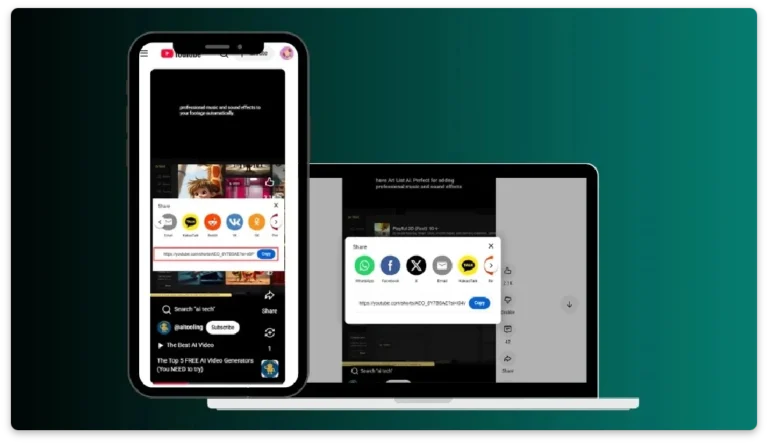
Step 1: Copy the Video Link
Find the video you want on YouTube, and copy the video URL.
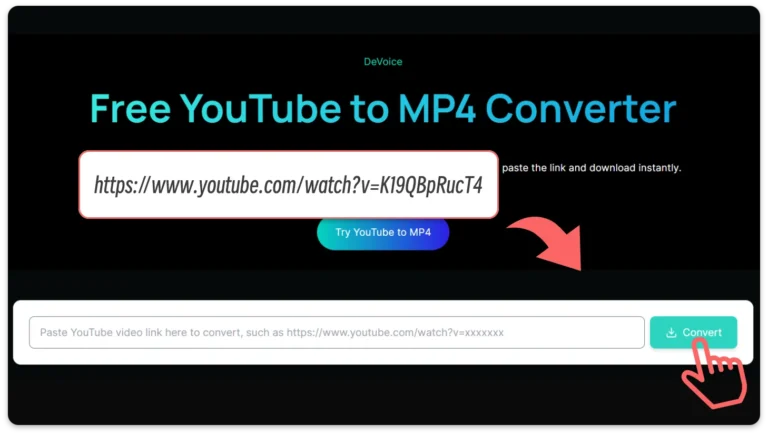
Step 2: Insert the URL
Go to DeVoice, paste your YouTube link into the conversion box, and hit 'Convert'.
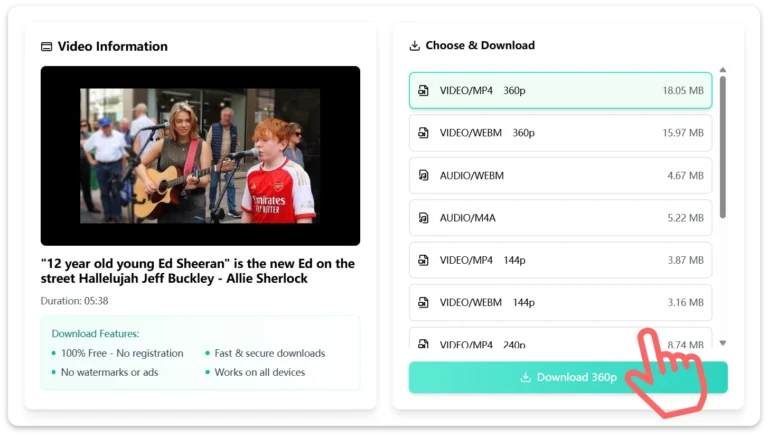
Step 3: Begin Download
Wait a few seconds, choose MP4 as your format and download your MP4 file directly to your device.
The power of DeVoice’s YouTube to MP4 Converter

Powerful AI Engine Built for Speed and Stability
DeVoice uses an optimized conversion engine designed to handle YouTube to MP4 tasks quickly and reliably. Unlike many online tools that slow down during peak hours, DeVoice focuses on performance consistency. Videos are parsed and converted within seconds, giving users a smooth experience without delays, pop-ups, or unnecessary steps.
Simple, Clean, and Completely Free to Use
What makes DeVoice stand out is its simplicity. There are no sign-ups, no ads, and no hidden limitations. The interface is clean and easy to understand, so anyone can convert a YouTube video to MP4 without technical knowledge. Everything works directly in the browser, making the entire process fast and frustration-free.

Universal MP4 Output for Any Device or Workflow
DeVoice converts videos into standard MP4 files that work across laptops, smartphones, tablets, TVs, and presentation devices. This universal compatibility makes it easy to watch videos offline, include clips in projects, or store content for personal reference. The output is practical, flexible, and ready to use anywhere.

More Than Conversion: Smart Audio & Text Processing
Beyond video conversion, DeVoice offers advanced AI-powered features such as audio extraction and speech-to-text processing. Users can turn lectures into notes, extract subtitles, or repurpose video content into written material for blogs, captions, or research.
Frequently Asked Questions
Can I download a YouTube video if it's copyrighted?
Downloading copyrighted YouTube videos without the copyright owner's permission is illegal.
Is this YouTube to MP4 converter web-based?
Does video quality depend on the original source?
Can I use this tool on mobile devices?
Is registration required?
Are converted files stored by DeVoice?
Can I convert videos with any file size or quantity limits?
Is there any cost to use this YouTube to MP4 converter?
Choose the language that suits you best
Download Your MP4 Within Seconds
Experience fast, unlimited YouTube MP4 downloads with Devoice.